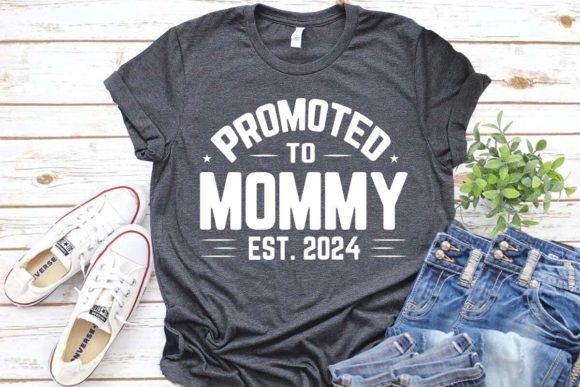
Promoted to Gramps Est.2024 T-Shirt Design: A Versatile, Print-Ready Digital Asset for Creators & Sellers
If you've ever scrolled through Etsy, Redbubble, or Merch by Amazon searching for fresh, heartfelt, and instantly recognizable family-themed apparel—especially designs that celebrate life’s joyful milestones—you’ve likely seen variations of the Promoted to Gramps Est.2024 T-shirt. But not all versions are created equal. What sets this particular digital design apart isn’t just its warm, nostalgic tone—it’s the full suite of professional-grade, multi-format files included, optimized for real-world production across dozens of platforms and tools.
Why This Design Fits Modern Creative Workflows
Today’s independent designers, print-on-demand entrepreneurs, and small-batch crafters need more than a pretty image—they need flexibility. The Promoted to Gramps Est.2024 T-shirt design delivers exactly that. It’s not a single JPG slapped onto a mockup. It’s a complete production toolkit: EPS, AI, SVG, PDF, high-res PNG (4500×5400 at 300 dpi), and JPG—all bundled in one ZIP file. That means whether you're prepping for sublimation on mugs, cutting vinyl decals for baby shower favors, or uploading to Printful for soft cotton tees, you’re covered.
No more resizing, no pixelated edges, no frantic last-minute conversions. Each file is purpose-built: the SVG works flawlessly with Cricut and Silhouette machines; the EPS and AI files retain vector scalability for professional screen printing; the PNG includes transparent background and crisp anti-aliasing for clean overlays on social media or digital invitations.
What You Actually Get—and Why It Matters
Let’s break down what’s inside the download—and why each format earns its place:
- EPS & AI Files: Industry-standard vector formats. Perfect for commercial printers, large-format signage, or editing colors directly in Adobe Illustrator. Because it’s vector-based, you can scale it from a onesie tag to a 4×6 ft banner—no quality loss.
- SVG File: Essential for hobbyists and small businesses using cutting machines. Works natively with Cricut Design Space, Silhouette Studio, and Sure Cuts A Lot. Supports layers and color separation for multi-material projects (e.g., layered iron-on transfers).
- PDF File: Ideal for quick proofing, client presentations, or direct submission to some POD platforms that accept PDF uploads. Includes embedded fonts and color profiles for consistent output.
- JPG & PNG Files (4500×5400, 300 dpi): High-resolution raster options. The PNG includes transparency—critical for mockups, website banners, or digital ads. The JPG is optimized for fast loading on product pages without sacrificing clarity.
- 100 Color-Changing Capability: Built into the vector layers. Swap the “Gramps” text fill, the banner ribbon, even the year “2024” in seconds—no manual rework needed. Great for seasonal updates or personalization (e.g., “Promoted to Grandma Est.2024”).
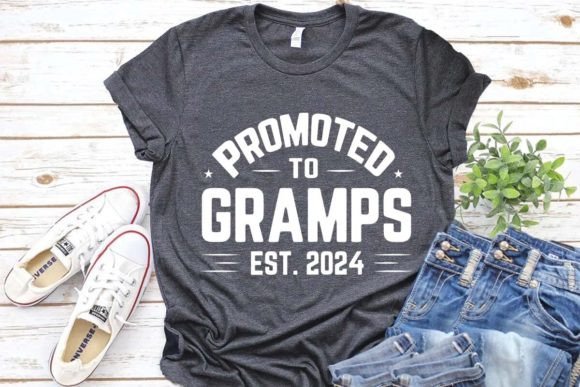
- Mockup Image (JPG): A ready-to-use, lifestyle-style photo showing the design on a relaxed-fit unisex tee. No Photoshop skills required—just drop your logo into your store listing and start selling.
This isn’t over-engineering—it’s time-saving foresight. Think about it: if you run an Etsy shop and get three custom requests in one week (“Can you change ‘Gramps’ to ‘Papa’?”, “Can you add a tiny heart next to the year?”, “Do you have it in navy blue?”), having editable vector files means you answer “Yes” in under two minutes—not two hours.
Where This Design Shines—Beyond the T-Shirt
The Promoted to Gramps Est.2024 T-shirt design wasn’t built just for apparel. Its clean lines, balanced typography, and warm, slightly vintage aesthetic make it highly adaptable:
- Sublimation Projects: Works beautifully on ceramic mugs, tote bags, and phone cases—especially with watercolor-style variants often bundled alongside.
- KDP Interior & Cover Design: Easily resized for greeting cards, journal covers, or activity books themed around grandparenting, retirement, or intergenerational connection.
- Vinyl & Iron-On Applications: Cut cleanly on Cricut Joy or Cameo 4—even intricate elements like the “Est.2024” banner stay sharp at 3” height.
- Digital Invitations & Printable Decor: Use the PNG in Canva to build baby shower invites, birthday party banners, or framed “Grandpa Wall Art” prints.
- Scrapbooking & Memory Keeping: Layer the SVG over photos in scrapbook software—or print and cut by hand for tactile, handmade keepsakes.
And because it’s part of a broader family-themed collection—including Promoted to Aunty Est.2024, Promoted to Grandma Est.2024, and holiday-specific variants—you can build cohesive bundles. Bundle six designs (e.g., Christmas Gramps + Halloween Papa + Birthday Grandpa) and price them at a slight discount. Customers love convenience—and creators love higher average order value.
Who Benefits Most From This Digital File?
You don’t need to be a graphic designer to use this well—but knowing your goals helps you maximize it.
Beginners on Etsy or Redbubble will appreciate the plug-and-play simplicity: upload the PNG to your product listing, pair it with the included mockup, and go live in under 10 minutes. No learning curve. Just results.
Mid-level POD sellers on Teespring or Printify benefit from the vector files—especially when optimizing for different garment types (e.g., adjusting spacing for pocket placement on polo shirts vs. crewnecks).
Local crafters and small studios gain real production leverage. Run a vinyl decal business? Use the SVG to create peel-and-stick “Gramps Approved” stickers for lunchboxes. Host senior-focused workshops? Print the design on cardstock and turn it into conversation-starting name tags.
Even educators and faith-based groups find uses—think Sunday school teacher appreciation gifts or retirement luncheon decor. The tone is uplifting but never cloying; nostalgic but not dated.
Practical Tips Before You Download or Sell
A few smart considerations before diving in:
- Check platform requirements: Merch by Amazon accepts PNG only (max 5000×5000); Printful prefers PNG or SVG; Cricut requires SVG or DXF. Match your file type to your destination.
- Test color accuracy: The design includes CMYK-ready vectors, but always do a physical proof if ordering bulk prints—especially for navy, burgundy, or heather gray tees where contrast matters.
- Respect usage rights: These files are licensed for commercial use—meaning you can sell products made with them—but not for resale *as digital files*. You can’t list the EPS on Creative Market as your own.
- Update the year thoughtfully: “Est.2024” is intentionally editable—but consider how long you want that date to remain relevant. Some sellers change it annually; others keep it evergreen with “Est.” alone.
Lastly—don’t overlook pairing. This design pairs effortlessly with complementary clipart: watercolor leaves, subtle halftone textures, or minimalist icons (hearts, rocking chairs, coffee mugs). A little visual harmony goes a long way in standing out on crowded marketplaces.
Final Thought: More Than a T-Shirt—It’s a Moment, Captured
The Promoted to Gramps Est.2024 T-shirt isn’t about fashion first. It’s about recognition. It’s the quiet pride in a new role, the laughter in a grandson’s “Gramps, look what I built!”, the slow shift from “Dad” to “Gramps”—carried forward with warmth and intention. And because the digital files support that sentiment across mediums, formats, and markets, it becomes more than merchandise. It becomes a tool for connection—printed on fabric, cut into vinyl, shared in pixels, held in hands.
That’s the real value behind every EPS, every SVG, every 300-dpi PNG. Not just pixels—but presence.