Editable Social Media Post Planner Canva: A Flexible, Print-Ready Tool for Consistent Content Planning
For creators, small business owners, and solopreneurs managing multiple platforms, consistency matters—but so does adaptability. The Editable Social Media Post Planner Canva is a digital planning resource designed to bridge that gap. Unlike static PDF planners or rigid scheduling apps, it’s built as a fully customizable Canva template. Every element—fonts, colors, spacing, layout blocks, photo placeholders—is editable directly in Canva’s free or Pro interface. You’re not locked into preset styles or fixed dates. Instead, you shape the planner to match your brand voice, workflow rhythm, and visual preferences.
What Makes This Planner Distinct From Other Planning Tools
Most social media planners fall into one of three categories: browser-based apps (like Buffer or Later), spreadsheet templates (often Excel or Google Sheets), or printable PDFs with limited interactivity. The Editable Social Media Post Planner Canva sits between the last two—but with meaningful advantages over both.
Compared to static printable PDFs, this planner avoids the frustration of uneditable text boxes or inflexible grids. You can resize columns for longer captions, swap out icons, adjust grid density for daily vs. weekly views, or reposition sections like “Hashtag Tracker” or “Post Review” based on your priority. Compared to spreadsheets, it offers stronger visual hierarchy and design cohesion—critical when planning content meant to be seen, not just tracked.
The inclusion of high-resolution 8.5 × 11-inch PDF, JPG, and PNG files means it works offline, prints cleanly at home or via professional services, and integrates seamlessly into hybrid workflows—say, reviewing monthly trends on screen while annotating a printed yearly overview with a pen.
Key Features—and How They Translate to Real Use Cases
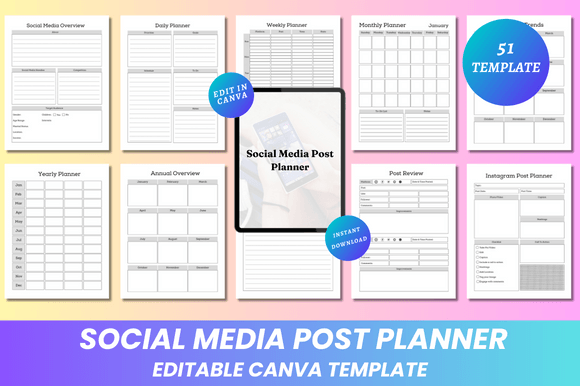
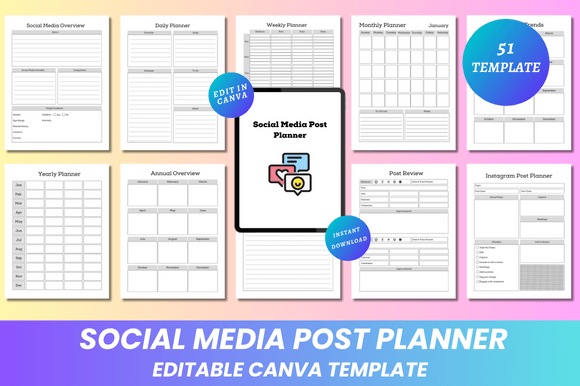
The 51-page interior includes structured yet flexible components. Rather than generic sections, each serves a functional role grounded in actual planning behavior:
- Social Media Overview & Platform-Specific Planners: Dedicated pages for Instagram, LinkedIn, Twitter (X), Facebook, Pinterest, YouTube, and blogs—not as siloed checklists, but with tailored fields (e.g., “Ideal Post Length” for LinkedIn vs. “Hook First 3 Words” for TikTok-style captions).
- Trend & Review Cycles: Monthly Trends and Monthly Review pages encourage reflection—not just logging posts, but assessing engagement patterns, seasonal shifts, or platform algorithm changes. This supports iterative improvement without requiring analytics exports.
- Tracking Without Overhead: Followers Growth, Hashtag Tracker, and Campaign Tracker use simple tables and checkboxes—not dashboards or API integrations. That keeps setup time low and focus on insights, not configuration.
- Supporting Infrastructure: Password Log, Bill Payment Tracker, and Blog Income Tracker acknowledge that content creation exists within broader operational realities. These aren’t afterthoughts; they’re integrated at the same design level as post scheduling.
Importantly, none of these sections are pre-filled or date-locked. January–December monthly planners begin blank—no auto-populated holidays or assumptions about your launch timeline. You decide whether to plan three months ahead or map out a single campaign week-by-week.
When It Fits Well—And When It Might Not
This planner excels for users who value control over aesthetics and structure but don’t need real-time collaboration, auto-publishing, or cross-platform analytics. If your workflow involves designing visuals in Canva already—or if you regularly tweak templates for client presentations or team briefings—the learning curve is minimal. You open the link, duplicate the design, and start editing.
It’s especially practical for those managing 2–4 platforms with moderate output (3–7 posts per week), where over-engineered tools add friction rather than clarity. A freelance copywriter using it to align blog drafts, LinkedIn carousels, and Pinterest pins gains consistency without switching tabs. A small e-commerce owner tracking holiday campaigns across Instagram and email sees how budget, timing, and creative assets intersect—visually and chronologically.
That said, it isn’t ideal for teams needing simultaneous editing or version history. Canva’s real-time co-editing works, but permissions and change tracking are more basic than Figma or Notion. Nor does it replace scheduling tools: there’s no calendar sync, no buffer queue, and no reminder system. You’ll still need to manually export or copy captions into your publishing platform.
Similarly, if your planning relies heavily on live data—like pulling follower counts automatically or syncing with Google Analytics—it won’t fulfill that function. It’s a manual, reflective tool—not an automated dashboard.
Design Quality and Practical Output
The clean, minimal aesthetic isn’t just stylistic—it improves usability. Ample white space prevents visual fatigue during long planning sessions. Consistent typography scales well across devices, and color palettes are chosen for readability (not just brand alignment). That matters when reviewing a “Yearly Overview” page filled with goals, metrics, and action steps.
The print-ready PDFs meet standard commercial printing specs: CMYK-ready, 300 DPI, embedded fonts, and bleed-free margins. JPG and PNG exports retain crispness for digital sharing—say, embedding a “Monthly Planner” screenshot in a client report or sharing a “Post Ideas” board in a Slack channel.
Unlike some KDP interiors that compress content to fit page counts, this planner uses space intentionally. The “Goal Action Plan” and “Improvement Plan” pages include guided prompts—not just blank lines—helping users move from intention to execution without external frameworks.
How It Compares With Broader Planning Approaches
Many users weigh Canva-based planners against Notion templates, Excel trackers, or physical bullet journals. Each has tradeoffs:
- Notion templates offer database functionality and automation but require ongoing maintenance and familiarity with relational properties. The Editable Social Media Post Planner Canva trades that complexity for immediate visual clarity and zero setup beyond clicking a link.
- Excel/Google Sheets excel at calculations and filtering but lack intuitive spatial organization. Tracking “Best Time To Post” across five platforms becomes a pivot table—not a glanceable heatmap-style layout.
- Bullet journals support creativity and mindfulness but scale poorly for multi-platform, multi-month planning. Re-drawing monthly grids or reformatting hashtag sets month after month adds overhead the Canva planner eliminates.
Where the Editable Social Media Post Planner Canva stands out is in balancing flexibility with fidelity: you get the freedom to revise layouts mid-planning cycle, yet retain professional-grade output for sharing or printing.
Making a Practical Choice
If your current process feels fragmented—spreadsheets for scheduling, notes apps for ideas, separate trackers for income or passwords—this planner offers consolidation without abstraction. It doesn’t assume you’re a marketer, developer, or designer. It assumes you’re someone who plans, reflects, adjusts, and ships work—repeatedly.
Ask yourself: Do you prefer adjusting a layout visually rather than writing formulas? Do you print quarterly reviews or share PDF summaries with stakeholders? Do you value having one source file that adapts to Instagram carousels today and a YouTube content calendar next month? If yes, the Editable Social Media Post Planner Canva fits naturally into that rhythm.
It won’t replace your analytics suite or your publishing tool—but it may simplify how you connect insight to action, one editable frame at a time.