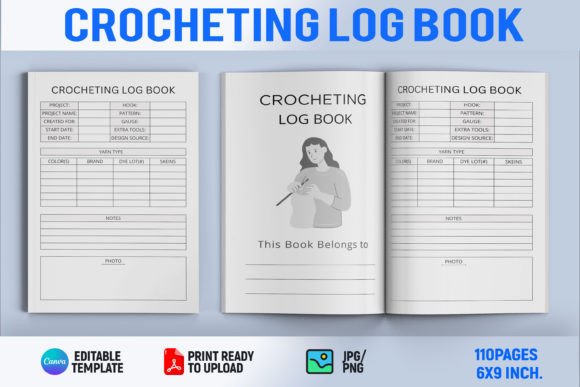
Crocheting Log Book Canva Template
Whether you're tracking stitch counts for your latest amigurumi project, documenting yarn substitutions across dozens of patterns, or building a printable resource to sell on KDP, a well-structured crocheting log book makes all the difference. The Crocheting Log Book Canva Template is a ready-to-use, editable interior layout designed specifically for Kindle Direct Publishing — but its real value lies in how thoughtfully it adapts to *your* workflow, goals, and experience level.
What It Is (and What It’s Not)
This isn’t just a blank notebook page with “Crochet Log” at the top. It’s a professionally formatted, print-ready Canva template built for KDP’s interior requirements: proper margins, bleed-safe design, consistent typography, and responsive spacing for both digital and paperback formats. You open it in Canva (free or Pro), change colors, swap fonts, adjust headers, insert your own cover art or branding elements — then download as PDF for upload to KDP.
It’s not a physical product. It’s not pre-filled with content. And it doesn’t require Photoshop or InDesign. That distinction matters — especially if you’ve ever spent hours wrestling with page breaks or font licensing issues while trying to self-publish a craft journal.
Why It Fits Different People — Differently
A beginner crocheter launching their first KDP book might care most about clarity and simplicity. They need a layout that guides readers intuitively — clear date fields, space for pattern names and hook sizes, checkboxes for project status, and room for notes without overwhelming white space. For them, the Crocheting Log Book Canva Template removes guesswork: no designing from zero, no second-guessing line height or gutter width. They can focus on writing helpful prompts and organizing practical categories — like “Yarn Used,” “Time Spent,” or “Modifications Made.”
A freelance designer or educator building resources for students might prioritize flexibility and scalability. They may use the same base template across multiple books — one for beginners, another for lace specialists, a third for Tunisian crochet enthusiasts. With Canva’s layers and text boxes, they can duplicate pages, rename sections (“Gauge Tracker” → “Tension Notes”), and even add QR codes linking to video tutorials. Their evaluation isn’t about whether it “looks nice” — it’s whether it supports iteration, consistency, and audience-specific utility.
For small business owners selling digital downloads alongside physical kits, commercial value and reliability are key. They’ll test how cleanly the template exports to PDF (no shifted elements, no missing fonts), whether it scales across trim sizes (5×8”, 6×9”, 7×10”), and how easily it integrates into their existing brand palette. A mismatched header font or inconsistent spacing could undermine perceived professionalism — something this template avoids by default, thanks to its balanced grid and typographic hierarchy.
Practical Uses Across Real Projects
- Hobbyists turning passion into income: One maker used the template to build a 120-page “Crochet Project Tracker” — complete with seasonal themes, progress charts, and yarn inventory logs. She sold it as a low-cost digital download on Etsy and later expanded it into a KDP paperback with custom covers — reusing the same interior layout across both formats.
- Educators creating classroom tools: A fiber arts instructor adapted the template into a student workbook, adding reflection prompts (“What surprised you about this stitch?”) and peer-review checklists. She exported individual pages as handouts and compiled the full version for course bundles — all without needing permission for licensed fonts or worrying about copyright-safe graphics.
- Freelance writers documenting R&D: A technical writer testing new crochet patterns kept detailed logs using the template’s structured tables — noting tension changes with different yarn weights, blocking results, and wear-test observations over time. Later, she repurposed those logs into a niche guide on “Durable Crochet for Outdoor Use,” using the same clean layout to maintain credibility and readability.
What to Consider Before You Choose
If speed is your priority — say, you’re launching a series of themed log books every month — this template saves hours per title. But if you need deep customization (like embedded spreadsheets or interactive form fields), Canva won’t support that. It’s ideal for static, print-first interiors — not dynamic digital workbooks.
Quality-wise, it meets KDP’s production standards out of the box: CMYK-friendly color options, high-res placeholder areas, and typography optimized for readability at small sizes. Still, always proof your final PDF on multiple devices — especially if you’re including hand-drawn icons or custom illustrations.
Creativity isn’t limited here — it’s redirected. Instead of troubleshooting layout bugs, you’re choosing which section to highlight first, deciding how much whitespace supports calm reflection versus dense data capture, or selecting a color scheme that evokes wool warmth rather than clinical precision.
Does It Match Your Next Step?
Ask yourself:
- Are you publishing a log-style book — not fiction, not a photo-heavy pattern collection, but something meant to be written *in*, referenced often, and organized for repeated use?
- Do you want full control over visuals without hiring a designer or learning complex software?
- Is consistency across titles important — whether for branding, teaching continuity, or building a recognizable product line?
- Do you value reliability over novelty? (This isn’t a flashy gimmick — it’s a sturdy, tested foundation.)
If three or more resonate, the Crocheting Log Book Canva Template likely fits. It won’t replace your voice, your expertise, or your unique approach to crochet — but it will hold space for all of it, cleanly and confidently.
And that’s what good tools do: they disappear when you’re in flow, so your ideas — and your stitches — stay front and center.