Income Expenses Tracker Canva Template
The Income Expenses Tracker Canva Template is a pre-designed, printable and editable financial planning tool built for individuals who want to monitor personal or small-business income and spending without relying on complex software. It provides a structured, visual layout optimized for manual or semi-digital use—offering clarity, consistency, and ease of customization through Canva’s interface.
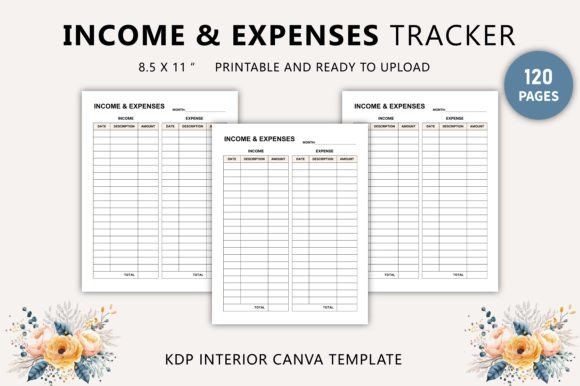
This template is distributed as part of a KDP (Kindle Direct Publishing) interior package, meaning it meets Amazon’s formatting standards for print-on-demand workbooks. Buyers receive two core deliverables: a print-ready PDF file and an editable Canva link. The PDF is formatted to industry specifications—8.5 × 11 inches, 120 pages, 300 DPI resolution, CMYK color mode, and no bleed—ensuring professional-quality physical output. The Canva link allows users to adjust fonts, colors, labels, and layout elements before exporting their own versions.
People often seek the Income Expenses Tracker Canva Template when they need a reliable, low-friction way to record transactions over time. Unlike spreadsheets that require setup and formula knowledge—or apps that may collect data or require subscriptions—this template offers immediacy and control. It suits those who prefer tactile tracking (e.g., journaling with pen and paper), educators designing classroom financial literacy activities, freelancers managing irregular income, or caregivers overseeing household budgets.
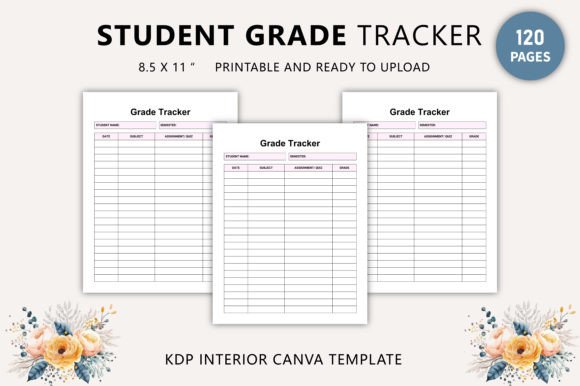
One key benefit is its design fidelity. The template features original, non-stock artwork and typography, crafted specifically for readability and functional spacing. Each page includes clearly labeled sections for date, description, category, income amount, expense amount, and running balance—reducing entry errors and supporting habit formation. Because it’s built in Canva, users can personalize headers, add logos, translate labels, or reorganize columns without design expertise. The inclusion of JPG and PNG files also supports digital note-taking apps that accept image-based notebooks (e.g., GoodNotes or Notability).
However, tradeoffs exist. As a static, page-based system, the Income Expenses Tracker Canva Template does not auto-calculate totals, generate charts, or sync across devices. Users must manually update balances and summarize monthly data. This makes it less suitable for those needing real-time analytics, multi-currency support, or automated bank feeds. Similarly, while the 120-page count accommodates several months of daily entries, long-term users may need to print additional copies or manage multiple files—unlike cloud-based tools that scale indefinitely.
Another consideration is workflow alignment. The template assumes consistent, intentional data entry. If users skip days or mislabel categories, the tracker’s usefulness diminishes without periodic review. There is no built-in guidance for budgeting methodology (e.g., zero-based vs. envelope systems) or financial goal setting—those layers must be added externally. That said, its simplicity can be an advantage: it avoids feature bloat and encourages reflection over automation.
The Income Expenses Tracker Canva Template is a strong fit in specific contexts. It works well for students learning foundational money management, remote workers seeking a screen-free alternative during focused hours, or creators building companion resources for finance courses or coaching programs. Its KDP-compliant interior also makes it viable for self-publishing as a standalone workbook—especially when bundled with instructional content or reflection prompts. Educators appreciate the clean grid structure for assigning weekly tracking exercises, and therapists using financial wellness interventions may find the neutral, non-judgmental layout supportive for client engagement.
Conversely, alternatives may be preferable depending on goals. Those prioritizing automation should consider spreadsheet templates (e.g., Google Sheets with prebuilt formulas) or dedicated apps like Mint, YNAB, or PocketGuard—tools that import transactions, categorize spending, and flag anomalies. For collaborative budgeting (e.g., couples or small teams), shared cloud documents offer real-time editing and version history, which static PDFs cannot replicate. And if brand consistency is essential—for example, a financial coach distributing branded materials—custom development (via Adobe InDesign or Figma) may provide greater flexibility than Canva’s constraints, especially for advanced typography or interactive elements.
When evaluating whether the Income Expenses Tracker Canva Template aligns with your needs, ask three practical questions: First, do you value immediate usability over computational power? If yes, this template reduces setup time significantly. Second, will you commit to regular, manual entry—and does the design motivate that behavior? Reviewing sample pages (if available) helps assess visual clarity and cognitive load. Third, what is your output requirement? If you plan to sell printed copies, the included CMYK, 300 DPI, no-bleed PDF meets printer specifications directly; if you only need digital use, the Canva link and PNG exports suffice.
It’s also worth noting compatibility expectations. While Canva supports most modern browsers and devices, full editing functionality requires a free or paid Canva account. Some advanced font or layer features may not export identically across platforms—particularly when switching between desktop and mobile editors. Users intending heavy customization should test edits early and verify final PDF output before bulk printing or distribution.
Finally, consider scalability. A 120-page layout typically supports about four months of daily tracking (assuming one page per day) or up to a year with weekly summaries. If longer-term archiving is needed, users can duplicate pages within Canva or combine multiple PDFs using standard tools. But unlike databases or apps, there’s no native search, filtering, or export-to-CSV function—so analysis remains manual unless supplemented with external tools.
In summary, the Income Expenses Tracker Canva Template occupies a distinct niche: it bridges the gap between analog discipline and digital adaptability. It is neither a replacement for robust financial software nor a minimalist sketchpad—it is a thoughtfully scaffolded tool for people who benefit from structure, visual consistency, and ownership over their tracking process. Its strength lies in intentionality, not intelligence; in accessibility, not automation. Whether it serves your purpose depends less on technical capability and more on how you engage with money—as data, as habit, or as narrative.