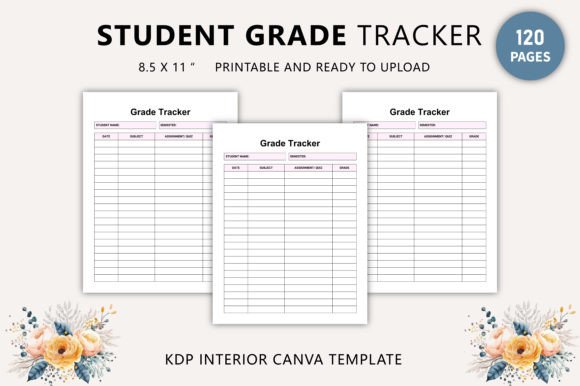
Student Grade Tracker Canva Template
If you're supporting students—whether as a teacher, homeschool parent, tutor, or academic coach—you know how much clarity a well-organized grade tracker brings. The Student Grade Tracker Canva Template isn’t just another spreadsheet or printable PDF. It’s a thoughtfully structured, print-ready design system built for real-world use: clean lines, intentional spacing, consistent hierarchy, and visual calm that reduces cognitive load—not adds to it.
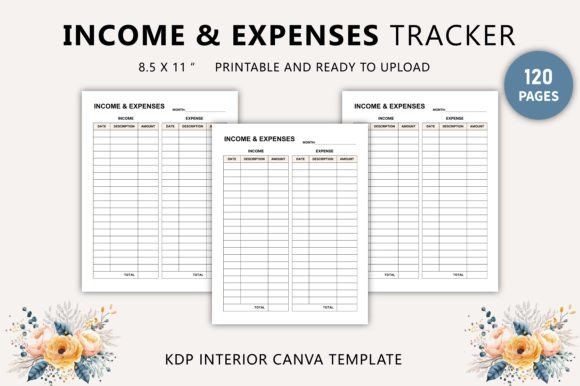
This isn’t generic clipart-style education decor. It’s a 120-page, 8.5 × 11-inch resource designed with educators and creators in mind—professionally laid out in CMYK at 300 DPI, zero bleed, fully editable via Canva, and delivered as high-resolution JPG, PNG, and print-optimized PDF files. Every page balances function and form: clear subject headers, intuitive grading scales, date columns with room for notes, and subtle visual cues (like color-coded sections or gentle dividers) that guide the eye without shouting.
A Tool That Works Quietly—But Changes How You Track Progress
The strength of the Student Grade Tracker Canva Template lies in its restraint. There are no flashy animations, no distracting gradients, no overdesigned icons competing for attention. Instead, it uses modern typography principles—consistent font weights, ample white space, logical alignment—to make data feel approachable. It reads like a well-edited textbook: trustworthy, legible, and quietly authoritative.
That consistency extends across all 120 pages. Whether you’re logging quiz scores for Week 3 or reviewing semester-long trends for a student portfolio, the layout stays predictable. That predictability builds muscle memory—especially helpful when juggling multiple classes, learners with diverse needs, or collaborative grading between co-teachers.
More Than a Tracker—It’s a Design Asset You Own
You’ll receive two core deliverables: a ready-to-print PDF and an editable Canva link. The PDF is production-ready—CMYK, 300 DPI, no bleed—so whether you’re printing at home, sending to a local print shop, or ordering bulk copies through KDP, colors stay accurate and text remains razor-sharp. The Canva link gives you full control: swap colors to match your school’s branding, adjust column widths for longer assignment names, add your logo to the cover page, or even translate headers for bilingual classrooms.
This dual-format approach makes the Student Grade Tracker Canva Template unusually flexible. Designers use it as a starting point for custom learning management systems. Publishers integrate it into study planner bundles sold on Etsy or Amazon KDP. Homeschool collectives adapt it for co-op reporting. And small education startups embed it into onboarding kits for new tutors—because it saves hours of formatting time while still feeling personal and intentional.
Where It Fits Best—And Where It Doesn’t
Like any strong design asset, this template shines where structure matters more than spontaneity. It works exceptionally well in:
- Classroom administration—tracking rubric-based assessments, participation, and revision cycles;
- Homeschool recordkeeping—meeting state reporting requirements with clean, audit-ready documentation;
- Tutoring businesses—generating professional progress reports for parents;
- Educational publishing—as interior layouts for workbooks, planners, or supplemental learning guides;
- Teacher training materials—demonstrating best practices in formative assessment tracking.
It’s less suited for highly creative or narrative-driven projects—think illustrated children’s activity books or abstract art journals—where visual rhythm takes priority over data fidelity. But within its lane—functional, information-dense, learner-centered documentation—it delivers precision without coldness.
Design Integrity Built In
Every element supports readability and usability. Headers use a clean sans serif with enough weight to establish hierarchy but not so much that they overwhelm body text. Data cells have generous padding—no cramped numbers or clipped letters. Page numbers are discreet but present. Even the margins follow standard print guidelines, avoiding content cutoff on binding or trimming.
The color palette is intentionally neutral—soft grays, muted blues, warm off-whites—so it adapts easily to different contexts. Want bolder contrast for low-vision users? Swap in high-contrast versions using Canva’s color picker. Need pastel tones for a younger audience? Adjust saturation in seconds. Because the base design is built on typographic discipline—not decorative noise—the edits hold up.
Practical Tips Before You Customize
Before diving into edits, consider these real-world checks:
- Test readability at actual size: Zoom out to 100% in Canva or open the PDF on a tablet—does text remain crisp? Are column labels easy to scan mid-lesson?
- Review font pairings carefully: If adding custom headers or footers, stick to fonts with similar x-heights and proportions. A mismatched script or ultra-thin display font can undermine the template’s grounded tone.
- Check commercial use scope: This is a 100% original design, licensed for both personal and commercial use—including resale in digital bundles, physical planners, or subscription-based educator resources. No attribution required.
- Validate print output: Print a test page on your target paper stock. Matte vs. glossy, 24 lb vs. 32 lb—small differences affect contrast and ink spread. The CMYK + 300 DPI setup minimizes surprises, but tactile testing is irreplaceable.
One final note: this isn’t a “set-and-forget” tool. Its value multiplies when you treat it like a living document—updating categories per term, archiving old trackers, reusing layouts across grade levels. The editable Canva link means version control is simple. Keep one master file, duplicate for each student or class, and maintain your own archive system outside the template itself.
The Student Grade Tracker Canva Template doesn’t promise to solve every administrative challenge—but it does remove friction from a task that eats up too much valuable time. When the design disappears into the background and lets the data speak clearly, that’s when you know you’ve got something useful. Not flashy. Not trendy. Just right.