Why the Editable Newborn Planner Canva KDP Is a Game-Changer for New Parents and Sellers Alike
Bringing home a newborn is equal parts magical and overwhelming. Between sleepless nights, feeding schedules, diaper changes, and tracking subtle health cues, it’s easy to feel like you’re juggling too many balls—and dropping most of them. That’s where the Editable Newborn Planner Canva KDP steps in—not as another app or subscription, but as a thoughtful, flexible, and beautifully designed tool that meets parents exactly where they are: on their phone, laptop, or printer.
A Planner Built for Real Life—Not Just Theory
This isn’t a static PDF you print once and abandon after Day 3. Every page in the Editable Newborn Planner Canva KDP Interior is fully customizable inside Canva—no design experience required. You can change fonts to match your nursery aesthetic, adjust colors to soothe your eyes at 3 a.m., resize headers for better readability, rearrange sections to prioritize what matters most *to you*, and drop in baby photos right where you want them. Whether you're logging first smiles, tracking pumping output, or noting when solids were introduced, the layout adapts—not the other way around.
And because it’s built for Canva, you’re not locked into one device or platform. Edit on your tablet while nursing, tweak the sleep tracker on your laptop during nap time, or finalize the growth chart on your phone while waiting at the pediatrician’s office. The editable Canva link gives you lifetime access—so if your baby hits milestones faster than expected (or slower), you can update the planner instantly—no re-purchase, no wait.
What’s Inside? More Than Just Pretty Pages
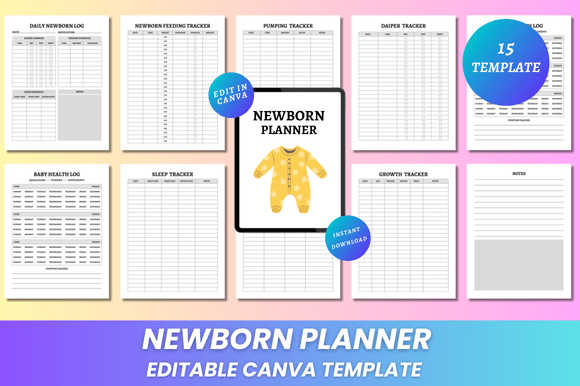
The Editable Newborn Planner Canva KDP delivers 15 thoughtfully structured pages—all sized at 8.5 x 11 inches, print-ready with no bleed, and optimized for clarity over clutter. Here’s how each section serves real-world needs:
- Belongs To Page — Personalize with baby’s name, birth date, weight, and parents’ contact info. Great for hospital bags, daycare forms, or quick reference during urgent calls.
- Daily Newborn Log — Capture the full picture: feed times, duration, side used, mood, and even notes about latch or comfort. No more scribbling on sticky notes or forgetting details between feeds.
- Newborn Feeding Tracker — Supports both breastfeeding and bottle-feeding. Track frequency, volume, and type (colostrum, formula, combo) with clean checkboxes and intuitive fields.
- Pumping Tracker — Log session times, output per side, bottle prep notes, and storage instructions. Especially helpful for returning-to-work parents building a freezer stash.
- Diaper Tracker — Monitor wet and soiled diapers separately—critical in the first week for assessing hydration and digestion. Includes space for observations like color, consistency, or irritation.
- Name & Health Log — Record immunizations, checkups, medications, temperature readings, and developmental signs (like eye contact or hand-coordination). Keeps everything in one place instead of scattered across apps and texts.
- Sleep Tracker — Map naps and nighttime stretches—not just duration, but start/end times, location (crib, bassinet, carrier), and soothing methods used. Helps spot patterns and gently guide healthy habits.
- Introduction to Solids — A forward-looking section for when baby nears 4–6 months. Log first foods, reactions, textures tried, and progression notes—without needing a second planner later.
- Growth Tracker — Plot head circumference, length, and weight month by month. Visual charts make trends obvious—and ease conversations with your pediatrician.
- Notes Page — Blank space with gentle guidance prompts (“Things I want to remember,” “Questions for next appointment,” “Mom wins this week”). Because sometimes what matters most doesn’t fit in a checkbox.
Designed for Print *and* Digital Flexibility
You’ll receive high-resolution, print-ready PDF files—crisp, professional, and perfectly aligned for home printers or local print shops. But unlike rigid templates, these files come paired with JPG and PNG versions too. Use the PNGs to create digital wallpapers, share milestone updates on social media (with privacy controls), or embed into care team communications. The JPGs work seamlessly in email summaries or telehealth intake forms.
That dual-format delivery means you’re never choosing between convenience and quality. Print a fresh copy every week—or keep the entire planner open on your tablet and swipe through tabs as needed. And since there’s no bleed, you won’t lose vital content near the edges—every inch of space is intentional and usable.
Why Sellers Love This Editable Newborn Planner Canva KDP
For creators on Amazon KDP or Etsy, this planner solves two big pain points: customer expectations and scalability. Buyers today don’t want generic, one-size-fits-all downloads—they want personalization, reliability, and visual cohesion. The Editable Newborn Planner Canva KDP Interior delivers all three.
Because every template is built in Canva, sellers can offer true customization without coding or complex software. Customers edit directly—no back-and-forth emails requesting font swaps or color changes. That means fewer support requests, higher satisfaction scores, and more organic reviews. Plus, the clean, minimal design appeals across aesthetics: modern, rustic, gender-neutral, or soft pastel—it’s all possible with a few clicks.
And with new designs added regularly, sellers can refresh listings seasonally, bundle seasonal variations (e.g., “Newborn + First Year Milestones”), or create targeted bundles (like “Newborn + Postpartum Wellness Planner”)—all using the same reliable Canva framework.
Who Benefits Most From This Planner?
It’s ideal for:
- New parents who value simplicity but need structure—especially those navigating NICU stays, multiples, or feeding challenges.
- Adoptive and foster families who benefit from clear documentation during transitions and early bonding phases.
- Doulas and postpartum caregivers who use consistent tools across clients and appreciate editable formats for custom notes and handoffs.
- Healthcare educators who integrate planners into prenatal classes or lactation support programs.
- KDP and Canva-based creators looking for a proven, high-conversion product with strong repeat-purchase potential.
Practical Tips Before You Customize
Start small. Open the editable Canva link and focus on just two sections first—the Daily Log and Feeding Tracker. Get comfortable changing colors and adding your baby’s name. Then gradually explore layout tweaks, like moving the Diaper Tracker above the Sleep Tracker if that fits your routine better.
Use Canva’s “Brand Kit” feature to save your preferred palette and fonts—so future edits (or sibling planners!) stay consistent. And always download your final version as a PDF *before* printing—even if you’ve edited dozens of times. That ensures formatting stays locked in.
Finally, don’t aim for perfection. Some days, filling out half a page counts as a win. The beauty of the Editable Newborn Planner Canva KDP lies in its flexibility—not its flawlessness.
More Than a Tool—It’s Peace of Mind, Delivered
In a world full of noisy baby apps, fragmented notes, and outdated paper trackers, this planner stands out by honoring how real parenting unfolds: unpredictably, tenderly, and uniquely. It doesn’t demand your time—it bends to fit it. It doesn’t assume your journey—it invites you to define it.
Whether you’re holding your baby for the first time or preparing your third child’s birth plan, the Editable Newborn Planner Canva KDP meets you with quiet confidence, clean design, and room to grow—just like your little one.