Savings Tracker Bundle Canva KDP
Tracking savings doesn’t have to mean spreadsheets, sticky notes, or forgotten goals. The Savings Tracker Bundle Canva KDP transforms financial intention into visual, personal, and actionable progress — all in a format you control from start to finish.
This isn’t a static PDF you print once and set aside. Every page is fully editable in Canva: swap fonts to match your brand voice, adjust colors to reflect your mood or aesthetic, resize sections for clarity, reorganize layouts to prioritize what matters most to you, and even drop in photos that inspire your “why.” Whether you’re saving for a dream house, a car, a vacation, or simply building $1,000 in 30 days, the structure supports your goal — and your creativity shapes how it feels.
What You Actually Get — No Guesswork
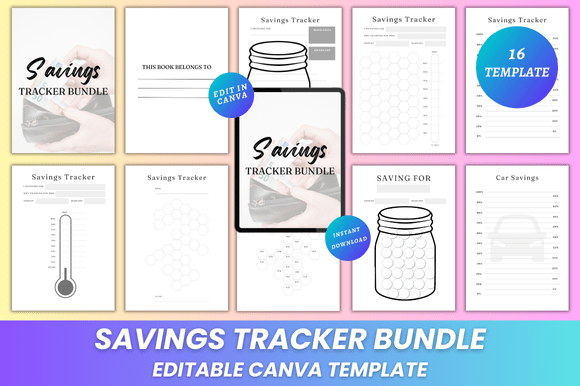
You receive 16 clean, A4-sized (8.3 × 11.7 inches) pages — no bleed, high-resolution, print-ready. That means crisp lines at home or professional output at any print shop. Alongside the editable Canva link, you’ll get:
- High-quality PDF files — optimized for printing and digital use
- JPG and PNG versions — ideal for sharing on social media, embedding in blogs, or using as desktop backgrounds
- A “Belongs To” page — personalize it with your name or business before gifting or reselling
- Seven distinct savings tracker pages — each purpose-built: “1000 Dollar In 30 Days,” “Car Savings,” “Dream House Savings,” “Saving For…”, “My Notes,” “Notes,” and “Thank You”
- Lifetime access and instant download — no waiting, no subscriptions
The design is intentionally minimal — not empty, but intentional. White space gives your goals room to breathe. Clear typography ensures readability. Consistent spacing and alignment keep your focus on progress, not formatting.
Creative Flexibility, Real-World Uses
Because everything is editable in Canva, this bundle adapts seamlessly across roles and intentions.
For educators and coaches: Turn “Dream House Savings” into a classroom activity — students set realistic goals, calculate monthly deposits, and track milestones visually. Swap out dollar amounts for local currency or use it as part of a financial literacy unit. Add school branding, logos, or learning objectives directly in Canva.
For small business owners and freelancers: Use the “Saving For…” page to map client project earnings toward equipment upgrades or tax reserves. Customize colors to match your website palette, then embed the JPG version in your client newsletter or resource library. Pair “My Notes” with quarterly reviews — jot down insights alongside actual savings data.
For content creators and bloggers: Repurpose the “1000 Dollar In 30 Days” tracker as a challenge series. Film weekly check-ins, overlay your Canva-edited tracker as a B-roll graphic, and share time-lapse edits showing how your layout evolved over the month. The PNG files let you layer them cleanly over video thumbnails or Instagram posts.
For gift-givers and wellness practitioners: Personalize “Belongs To” and “Thank You” pages with handwritten-style fonts and soft pastel tones. Print as a physical gift — bound with twine or slipped into a notebook — for someone starting their first intentional savings journey.
Design With Purpose — Not Just Decoration
Editing isn’t about making things “prettier.” It’s about increasing clarity and accountability. Here’s how to use that flexibility wisely:
- Start with function: Before changing colors, ask: “What action should this page prompt?” If it’s daily tracking, ensure date fields are prominent. If it’s long-term, emphasize milestone markers over decorative elements.
- Limit font families: Stick to one heading font and one body font. Canva offers dozens — choose two that contrast clearly but feel cohesive (e.g., Montserrat Bold + Lato Regular).
- Use color meaningfully: Green for completed milestones, amber for “on track,” red only for urgent gaps — not just because it looks bold. Consistency builds intuitive understanding over time.
- Respect margins and safe zones: When editing layout, keep critical text at least 0.5 inches from edges — especially if printing at home or through third-party services.
- Add context, not clutter: A small photo of your dream home beside the “Dream House Savings” tracker reinforces motivation. But avoid filling blank space just to “fill it.” Let white space do its job.
Practical Tips for Getting Started
You don’t need design experience — just intention. Open your Canva link, duplicate the page you’ll use first (e.g., “1000 Dollar In 30 Days”), and begin with these three steps:
- Define your target amount and deadline — write them in bold at the top. This becomes your anchor.
- Break it down — add a simple table or checklist showing weekly or biweekly deposits. Edit cell sizes so numbers fit without shrinking fonts.
- Assign meaning to visuals — use Canva’s shape tools to create a progress bar, or insert icons (a piggy bank, a key, a road sign) that resonate personally.
Then export what you need: PDF for printing, PNG for digital sharing, JPG for email attachments. Save your Canva file with a clear name — like “CarSavings_Q3_2024” — so you can revisit and refine later.
Why This Works Where Other Trackers Fall Short
Most printable trackers are either overly rigid (fixed fonts, locked layouts) or too generic (no goal-specific prompts). The Savings Tracker Bundle Canva KDP bridges that gap. It provides thoughtful scaffolding — seven unique tracker types, built-in reflection spaces (“My Notes”), and gratitude framing (“Thank You”) — while handing full creative control back to you.
It’s also platform-aware. Need a version for Instagram Stories? Resize to 1080×1920 in Canva and export as PNG. Preparing a client report? Embed the PDF into a Notion dashboard or Google Slides deck. Launching a course on budgeting? Drop the editable Canva link into your student portal — they customize, print, and own their journey.
New designs are added regularly — not as filler, but as responses to real user needs: seasonal savings themes, debt payoff variations, family contribution trackers. There’s no pressure to “keep up.” Just return when something aligns with where you are now.
If you’ve ever printed a tracker, filled three lines, and stopped — this bundle invites you to try again. Not with more discipline, but with better tools. Tools that adapt to your life, not the other way around.